
Diferencia entre revisiones de «GNU/Linux»
De TechShareRoom wiki
Más acciones
Sin resumen de edición |
|||
| (No se muestran 38 ediciones intermedias del mismo usuario) | |||
| Línea 1: | Línea 1: | ||
{{Infobox GNU/Linux}} | {{Infobox Remake | ||
|Título = GNU/Linux | |||
|Image = PixelTux.png | |||
|Nombre = Tux | |||
|Redes = | |||
[[Archivo:WordPress_blue_logo.png|30px|link=https://www.gnu.org]] | |||
}} | |||
== Distribuciones | {| class=prettytable | ||
|- | |||
! Arch Linux !! Garuda Linux !! Ubuntu | |||
|- | |||
| [[Archivo:ArchLinux.png|link=Arch Linux]] | |||
| [[Archivo:GarudaLinux.png|link=Garuda Linux]] | |||
| [[Archivo:Ubuntu.png|link=Ubuntu]] | |||
|} | |||
{| class=prettytable | |||
|- | |||
! Bazzite !! SteamOS !! Nobara Project | |||
|- | |||
| [[Archivo:Bazzite.png|link=Bazzite]] | |||
| [[Archivo:SteamOS.png|link=SteamOS]] | |||
| [[Archivo:NobaraProject.png|link=Nobara Project]] | |||
|} | |||
{| class=prettytable | |||
|- | |||
! Omarchy !! CachyOS !! RebornOS | |||
|- | |||
| [[Archivo:Omarchy.png|link=Omarchy]] | |||
| [[Archivo:CachyOS.png|link=CachyOS]] | |||
| [[Archivo:RebornOS.png|link=RebornOS]] | |||
|} | |||
{| class=prettytable | |||
|- | |||
! Batocera.linux !! Lakka !! ChimeraOS | |||
|- | |||
| [[Archivo:Batocera.linux.png|link=Batocera.linux]] | |||
| [[Archivo:Lakka.png|link=Lakka]] | |||
| [[Archivo:ChimeraOS.png|link=ChimeraOS]] | |||
|} | |||
= Entornos = | |||
{| class=prettytable | |||
|- | |||
! KDE Plasma !! Hyprland | |||
|- | |||
| [[Archivo:Kde-plasma.png|link=KDE Plasma]] | |||
| [[Archivo:Hyprland.png|link=Hyprland]] | |||
|} | |||
= Distribuciones = | |||
*[https://www.osboxes.org/ OSBoxes] | *[https://www.osboxes.org/ OSBoxes] | ||
*[https://distrowatch.com Distrowatch] | *[https://distrowatch.com Distrowatch] | ||
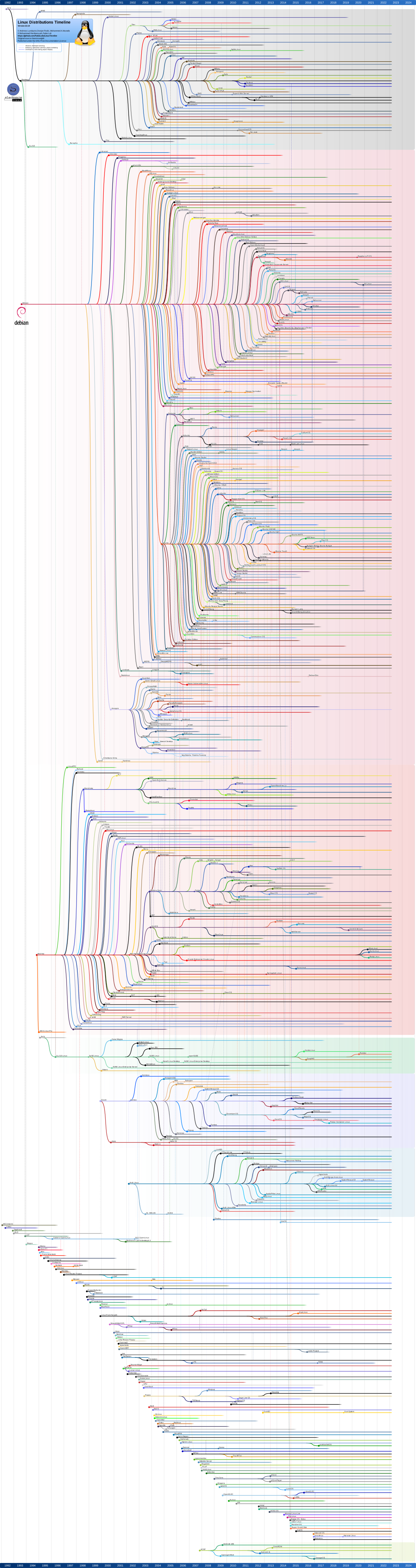
*[https://upload.wikimedia.org/wikipedia/commons/1/1b/Linux_Distribution_Timeline.svg Linux Distribution Timeline] - Fuente: [https://www.youtube.com/watch?v=2gSs2lenxQA Video de YT de @ForrestNight] | *Timeline | ||
**[https://upload.wikimedia.org/wikipedia/commons/1/1b/Linux_Distribution_Timeline.svg Linux Distribution Timeline] - Fuente: [https://www.youtube.com/watch?v=2gSs2lenxQA Video de YT de @ForrestNight] | |||
**[https://distrowatch.com/images/other/distro-family-tree.png Distrowatch] | |||
*[https://distrochooser.de/es Distrochooser] | *[https://distrochooser.de/es Distrochooser] | ||
*[https://distros.fushra.com/ Fushra distro picker] - Find your distro | |||
*[https://makelinux.github.io/kernel/map/ Linux Kernel Map] | |||
= Repositorios recomendados = | |||
*[https://github.com/Mayccoll/Gogh Color Scheme for Gnome Terminal, Pantheon Terminal, Tilix, and XFCE4 Terminal] - Fuente: [https://twitter.com/el_oscilador/status/1452318216412409858 Twitt de @el_oscilador] | |||
*[https://github.com/chick2d/neofetch-themes neofetch-themes] | |||
= Tutoriales = | |||
===== Guías ===== | |||
*[https://linuxcenter.es/aprende/guias-tutoriales Linux Center Valencia] | |||
*[https://gitlab.com/includeshadow/instalar-linux-bien-facil/-/wikis/home Instalar Linux Bien Fácil] | |||
*[https://learning.lpi.org/es/learning-materials/all-materials/ Linux Professional Institute] | |||
*[[Guía Gaming para Linux]] | |||
*[[Guía de hardening para servidores]] | |||
*Escritorio remoto | |||
**[https://www.youtube.com/watch?v=e35Fw79937c Como instalar y usar RustDesk] | |||
===== Acceso ===== | |||
*[[Entrar en Linux sin saber la contraseña]] | |||
*[[Autologin en Linux]] | |||
*[[Compartir carpeta en Linux y acceder desde Windows]] | |||
*[[Montar disco al inicio]] | |||
===== Passthrough ===== | |||
*[https://www.youtube.com/watch?v=eTWf5D092VY Single GPU Passthrough Tutorial - KVM/VFIO] | |||
*[https://github.com/joeknock90/Single-GPU-Passthrough joeknock90/Single-GPU-Passthrough] | |||
===== Comandos ===== | |||
*[https://linuxcommandlibrary.com/ linuxcommandlibrary.com] | |||
*[https://www.commandlinefu.com/ commandlinefu.com] | |||
*[https://github.com/tldr-pages/tldr tldr] | |||
===== Artículos ===== | |||
*[https://laboratoriolinux.es/index.php/-noticias-mundo-linux-/software/32614-linux-para-iniciados-todo-lo-que-debes-saber.html Linux para iniciados: todo lo que debes saber] | |||
*[https://ubunlog.com/distros-gnu-linux-gamers-2023/ Distros GNU/Linux Gamers 2023: Listado vigente al día de hoy] | |||
== | ===== Videos ===== | ||
*[https:// | *[https://www.youtube.com/watch?v=HrYtwz0Xe2Q Why I Code on Linux Instead of Windows] - [https://www.youtube.com/c/FKnight ForrestKnight] | ||
== | ===== Solución a problemas ===== | ||
*[https:// | *[https://askubuntu.com/questions/468721/how-can-i-empty-the-trash-using-terminal ¿Cómo borrar la papelera usando la terminal?] | ||
*[https://geekland.eu/reiniciar-el-entorno-escritorio-linux/ Reiniciar el entorno de escritorio] | |||
*[https://nenlinux.blogspot.com/2011/11/poner-n-y-tildes-con-teclados-en-ingles.html Poner ñ y tildes con teclados en inglés] | |||
**Seleccionar "Inglés EEUU internacional con teclas muertas" si la de "Ingles EEUU internacional con teclas muertas por Altgr" no configura bien el acento. | |||
*La operación solicitada ha fallado: Error mounting /dev/sda2 at /run/media/usuario/...: wrong fs type, bad option, bad superblock on /dev/sda2, missing codepage or helper program, or other error | |||
**sudo mkdir /mnt/disco | |||
**sudo mount /dev/sda2 /mnt/disco | |||
===== Enlaces ===== | |||
*[https://www.kernel.org Mainline Kernels] | |||
*[https://start.me/p/GEkrY5/software-libre Recursos a cerca de Software Libre] - Fuente: [https://t.me/maratonlinuxero Maratonistas Linuxeros] | |||
== Canales y Grupos de Telegram == | ===== Canales y Grupos de Telegram ===== | ||
*En español sobre Software Libre, Código Abierto y GNU/Linux - Fuente: [https://proyectotictac.com Proyecto Tic Tac] | |||
*01.- [https://t.me/evento24h24l Canal 24H24L] | *01.- [https://t.me/evento24h24l Canal 24H24L] | ||
*02.- [https://t.me/colaboratorio Canal Colaboratorio] | *02.- [https://t.me/colaboratorio Canal Colaboratorio] | ||
| Línea 78: | Línea 175: | ||
*61.- [https://t.me/maratonlinuxero Grupo Maratón Linuxero] | *61.- [https://t.me/maratonlinuxero Grupo Maratón Linuxero] | ||
*62.- [https://t.me/linuxentreamigos Linux entre amigos] | *62.- [https://t.me/linuxentreamigos Linux entre amigos] | ||
*63.- [https://t.me/+STG7Cn8Ek4VlNzFh includeshadow] | |||
* | |||
Revisión actual - 02:52 25 may 2026
| GNU/Linux | |
|---|---|
 | |
| Nombre | Tux |
| Redes | 
|
| Arch Linux | Garuda Linux | Ubuntu |
|---|---|---|

|

|

|
| Bazzite | SteamOS | Nobara Project |
|---|---|---|

|

|

|
| Omarchy | CachyOS | RebornOS |
|---|---|---|

|

|

|
| Batocera.linux | Lakka | ChimeraOS |
|---|---|---|

|

|

|
Entornos
| KDE Plasma | Hyprland |
|---|---|

|

|
Distribuciones
- OSBoxes
- Distrowatch
- Timeline
- Distrochooser
- Fushra distro picker - Find your distro
- Linux Kernel Map

Repositorios recomendados
- Color Scheme for Gnome Terminal, Pantheon Terminal, Tilix, and XFCE4 Terminal - Fuente: Twitt de @el_oscilador
- neofetch-themes
Tutoriales
Guías
- Linux Center Valencia
- Instalar Linux Bien Fácil
- Linux Professional Institute
- Guía Gaming para Linux
- Guía de hardening para servidores
- Escritorio remoto
Acceso
- Entrar en Linux sin saber la contraseña
- Autologin en Linux
- Compartir carpeta en Linux y acceder desde Windows
- Montar disco al inicio
Passthrough
Comandos
Artículos
- Linux para iniciados: todo lo que debes saber
- Distros GNU/Linux Gamers 2023: Listado vigente al día de hoy
Videos
Solución a problemas
- ¿Cómo borrar la papelera usando la terminal?
- Reiniciar el entorno de escritorio
- Poner ñ y tildes con teclados en inglés
- Seleccionar "Inglés EEUU internacional con teclas muertas" si la de "Ingles EEUU internacional con teclas muertas por Altgr" no configura bien el acento.
- La operación solicitada ha fallado: Error mounting /dev/sda2 at /run/media/usuario/...: wrong fs type, bad option, bad superblock on /dev/sda2, missing codepage or helper program, or other error
- sudo mkdir /mnt/disco
- sudo mount /dev/sda2 /mnt/disco
Enlaces
Canales y Grupos de Telegram
- En español sobre Software Libre, Código Abierto y GNU/Linux - Fuente: Proyecto Tic Tac
- 01.- Canal 24H24L
- 02.- Canal Colaboratorio
- 03.- Canal: De Novato a Novato
- 04.- Canal: DesdeLinux
- 05.- Canal DistritoTux
- 06.- Canal Diversistema
- 07.- Grupo DriveMeca
- 08.- Canal Atareado
- 09.- Canal Geekland
- 10.- Grupo GUTL
- 11.- Grupo Jugando en Linux
- 12.- Canal Linux Center
- 13.- Canal JuncoTIC
- 14.- Grupo Karlas Project
- 15.- Canal Karlas Project Stream
- 16.- Grupo Latin Linux
- 17.- Canal Latin Linux
- 18.- Grupo LibreOffice Hispano
- 19.- Grupo LiGNUx
- 20.- Canal Linux Adictos
- 21.- Grupo Liñux
- 22.- Grupo LinuxerOS
- 23.- Grupo LiNuXiToS
- 24.- Grupo Ocio libre y gratuito en GNU/Linux
- 25.- Canal Muy Linux
- 26.- Canal Ochobitshacenunbyte
- 27.- Grupo Pato JAD
- 28.- Canal Pato JAD
- 29.- Grupo Proyecto Tic Tac
- 30.- Canal Proyecto Tic Tac
- 31.- Canal Seducción Linux
- 32.- Grupo Linux Español
- 33.- Canal Ubunlog
- 34.- Canal uGeek
- 35.- Canal Victorhck
- 36.- Canal _ voidNull
- 37.- Canal La Guía Linux
- 38.- Grupo Locos por Linux
- 39.- Canal Podcast Linux
- 40.- Grupo Comunidad de Linux Español
- 41.- Canal SoloLinux
- 42.- Grupo SoloLinux Chat
- 43.- Grupo XUnix | Community
- 44.- Grupo MX Linux & AntiX Español
- 45.- Grupo Linux Ayuda (Libertad en Linux)
- 46.- Grupo: Privacidad y Software Libre
- 47.- Canal GNU Linux Latino
- 48.- Grupo Canaima GNU/Linux
- 49.- Canal Soberanía Tecnológica
- 50.- Canal LinuxBloc
- 51.- Grupo Jugando en GNU/Linux
- 52.- Canal Juegos Linux
- 53.- Canal Un Día Una Aplicación
- 54.- Canal Linux, seguridad y cosas informáticas
- 55.- Grupo #ViernesDeEscritorio
- 56.- #ViernesDeEscritorio
- 57.- Grupo ! Linux-ZEN
- 58.- Grupo Debian en Español
- 59.- Grupo Arch Linux en Español
- 60.- Grupo Amigos LibreOffice-ES
- 61.- Grupo Maratón Linuxero
- 62.- Linux entre amigos
- 63.- includeshadow